
Why Your WordPress Site is Slow (And How a Lightweight Cache Fixes It)
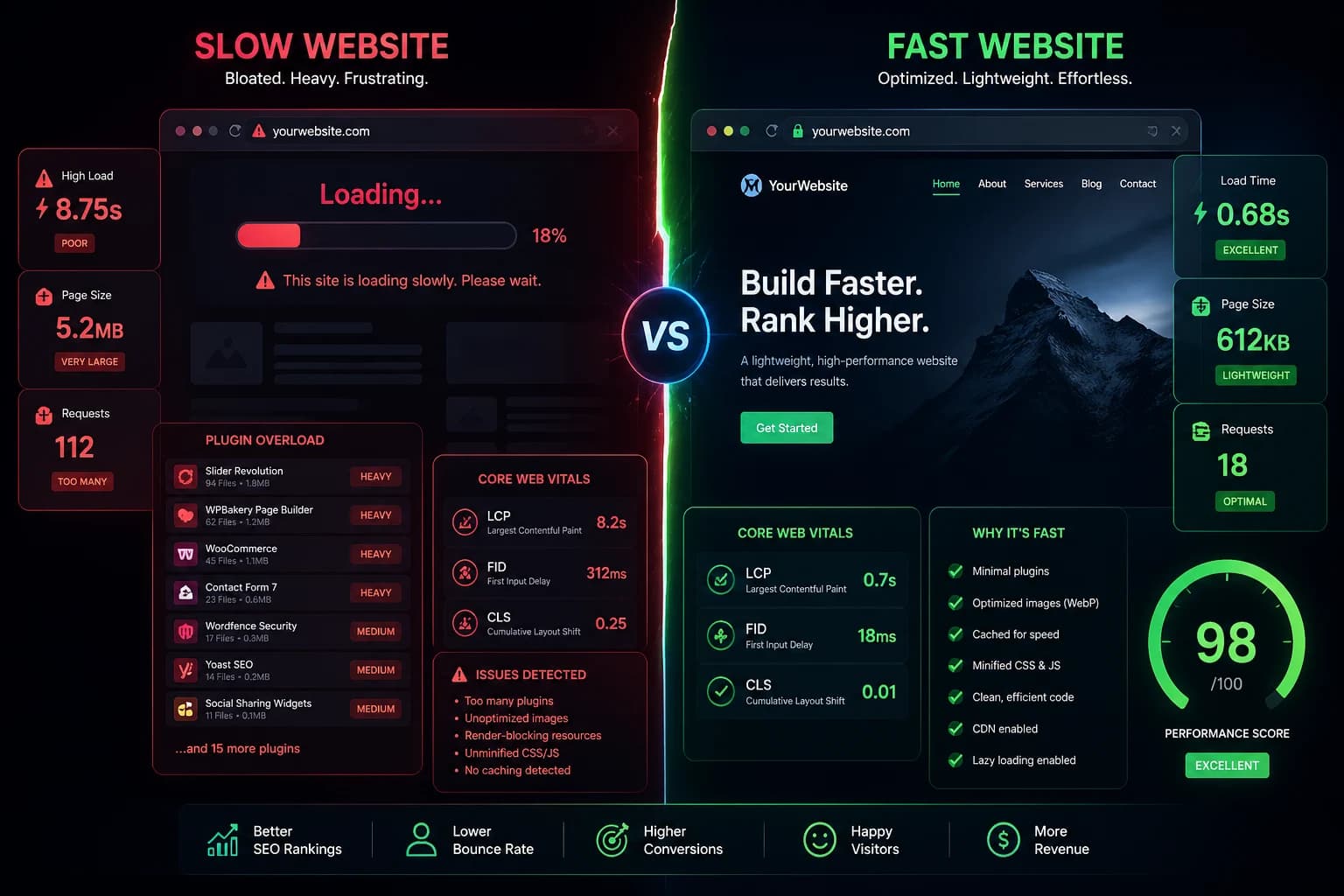
Your WordPress site could be losing visitors — right now — and you might not even know it. Studies show that 40% of users abandon a website if it takes more than 3 seconds to load, and a single second of delay can wipe out 7% of your conversions. If your site is sluggish, Google notices too, and it penalizes you in search rankings before a single visitor even clicks through.
The good news? Most WordPress speed problems come from the same handful of culprits. And fixing them doesn’t have to mean a full site rebuild or expensive developer fees. The right lightweight WP caching plugin can turn a bloated, slow-loading site into a lean, fast-loading one — sometimes in under five minutes.
Let’s break down exactly what’s slowing your site down, and how caching (done right) fixes it.
The Real Cost of a Slow WordPress Site
Before diving into the technical side, it’s worth understanding what slow page speed actually costs you.
Google has officially integrated Core Web Vitals into its ranking algorithm. To score well, your pages need a Largest Contentful Paint (LCP) under 2.5 seconds and a Cumulative Layout Shift (CLS) score below 0.1. Miss these benchmarks and your competitors — even ones with weaker content — can outrank you simply because their pages load faster.
The conversion impact is just as serious. Research consistently shows that a 0.1-second slowdown leads to a 7% drop in conversions. For an ecommerce store doing $10,000 a month, that’s $700 vanishing because your product pages take a fraction of a second longer to respond. Sites that pass Core Web Vitals tests also earn 3.7% more search visibility than sites that fail them — a meaningful edge in competitive niches.
The bottom line: page speed isn’t a “nice to have.” It’s a revenue driver.
What’s Slowing Your WordPress Site Down?
WordPress is flexible and powerful, but that flexibility comes with a cost. The more you add to it — themes, plugins, scripts, media — the more work your server has to do on every single page request. Here are the most common culprits.
Bloated Themes with Too Much Code
That premium theme with the 50-demo import, the mega-menu builder, the built-in slider, the parallax effects, and the full WooCommerce integration might look stunning in the preview. On a live server, it’s a different story.
Heavy themes load dozens of CSS stylesheets and JavaScript files that your pages may never use. Every unnecessary file is another HTTP request your server has to handle before a user sees anything. WordPress sites built with heavy themes load 2–4 seconds slower on average compared to minimal, purpose-built themes. That’s an enormous performance gap with a straightforward cause: too much code doing too little useful work.
A lightweight theme like GeneratePress adds less than 10KB gzipped to your page. A bloated theme can push that figure into the megabytes — before you’ve even installed a single plugin.
Too Many Plugins (Especially Conflicting Ones)
Plugins are one of WordPress’s greatest strengths. They’re also one of the most common reasons sites grind to a halt.
The problem isn’t plugins themselves — it’s plugin accumulation. Each plugin adds PHP code, database queries, and sometimes additional JavaScript and CSS to every page load. Individually, a well-coded plugin adds minimal overhead. Collectively, they add up fast. The average WordPress site makes 91 HTTP requests per page load, and plugins are a major contributor to that number.
WordPress sites running 20 or more plugins are, on average, 40% slower than clean, minimal setups. That’s not a small difference. And if two plugins are doing overlapping jobs — say, two SEO plugins or two caching tools — the conflict can compound performance issues dramatically.
Heavy JavaScript and Render-Blocking Scripts
Modern WordPress sites often rely on page builders like Elementor or Divi to create visual layouts without code. These tools are genuinely useful, but they come with a performance trade-off: page builders typically increase load time by 0.8 to 2.2 seconds compared to hand-coded pages.
The culprit is JavaScript. Page builders inject large amounts of JS that must be parsed and executed before your browser can finish rendering the page. This is what Google calls “render-blocking” — scripts that pause the page from displaying while they load. On mobile devices, where CPU power is limited, this problem is even worse. JavaScript is often the single biggest performance bottleneck for mobile users, and mobile users make up more than half of global web traffic.
Third-party scripts — analytics, chat widgets, social media embeds, ad networks — pile onto this problem. Each one adds external HTTP requests that your server can’t control or optimize.
Unoptimized Images
Images are consistently the heaviest assets on most web pages. High-resolution photos uploaded straight from a camera or design tool can be 5–10MB in size, forcing every visitor to download huge files before they can see your content.
Compressing images and converting them to modern formats like WebP can reduce file size by up to 80% with no visible quality loss. WebP-enabled sites load 25–35% faster than sites relying on traditional JPEG and PNG. Yet many WordPress site owners still upload unoptimized media and wonder why their LCP scores are in the red.
Missing or Misconfigured Caching
This is the most impactful issue of all — and the most fixable. Every time a visitor lands on your WordPress page without caching in place, your server runs through the full PHP and MySQL gauntlet: query the database, execute the theme logic, render the HTML, and send it back. For a site with moderate traffic, this happens hundreds or thousands of times per hour.
Caching solves this by storing a pre-built version of each page and serving it directly on subsequent requests — no database queries, no PHP execution. The result? Caching can improve site loading speed by 20–50%, and a properly configured setup can make your site 2–5 times faster, with direct improvements to LCP scores.
The catch is that not every caching plugin is created equal. Heavy, bloated caching plugins can actually strain your server with their own overhead — eating into the performance gains they’re supposed to deliver.
The Right Solution: A Lightweight WP Caching Plugin
This is where WP Lightbeam Cache comes in.
Most caching plugins are built to do everything: caching, database cleanup, image optimization, CDN integration, minification, lazy loading — all bundled into one increasingly heavy plugin. That all-in-one approach sounds appealing, but it introduces its own overhead. The plugin itself becomes part of the problem.
WP Lightbeam Cache takes a different philosophy. It’s purpose-built as a lightweight WP caching plugin — laser-focused on one job: serving pre-built HTML files to your visitors with the lowest possible server footprint.
How WP Lightbeam Cache Works
When a visitor lands on your page for the first time, WP Lightbeam Cache generates a static HTML copy of that page and stores it. Every subsequent visitor receives that cached file instantly — no PHP, no database, just clean HTML delivered at server speed.
The result is dramatically faster page loads without taxing your hosting resources. This matters especially for sites on shared hosting, where server resources are limited and plugin-heavy setups can cause timeouts and slowdowns during traffic spikes.
Low Overhead by Design
Where heavyweight caching plugins run background processes, aggressive pre-warming routines, and complex database operations of their own, WP Lightbeam Cache stays lean. Its admin dashboard stays responsive, it doesn’t spawn unnecessary server processes, and it doesn’t conflict with your other plugins.
This is the core advantage of a genuinely lightweight WP caching plugin: it solves the performance problem without adding to it.
Smart Cache Invalidation
One concern with caching is stale content — what happens when you publish a new post or update a page? WP Lightbeam Cache handles this automatically. When you update content, the relevant cached files are refreshed immediately, so your visitors always see current content without you having to manually clear anything.
Broad Compatibility
WP Lightbeam Cache works across standard hosting environments — Apache and Nginx — without requiring server-level configuration changes. It integrates cleanly with common WordPress setups, including popular themes, WooCommerce, and major SEO plugins, making it a practical choice for real-world sites rather than a tool that only works in ideal lab conditions.
What to Expect After Installing a Lightweight Cache
The performance improvements from adding a well-configured caching plugin to a previously uncached site are often dramatic. Based on how static file caching works in practice, here’s what typically changes:
Server response time (TTFB) drops significantly because the server no longer has to process PHP and run database queries for every visitor. Google’s recommended TTFB is under 200ms — something uncached WordPress sites on average hosting rarely achieve.
LCP scores improve because the HTML itself reaches the browser faster, allowing the page to begin rendering earlier.
Bounce rates decrease as visitors no longer abandon pages while waiting for content to appear. Reducing bounce rate from a 3-second to a 1-second load time can cut bounce probability by up to 32%.
Server stability improves during traffic surges because cached pages consume a fraction of the resources needed to process dynamic requests.
FAQ: WordPress Caching and Site Speed
Does a caching plugin really make a noticeable difference?
Yes — it’s often the single biggest performance improvement available to a WordPress site. For sites without any caching, adding a well-configured caching plugin can make pages load 2 to 5 times faster. The effect is most pronounced on shared hosting where server resources are constrained.
Won’t a caching plugin break my dynamic content like forms or shopping carts?
Good caching plugins are designed to exclude dynamic pages automatically. Checkout pages, login pages, user dashboards, and form submissions should never be cached. WP Lightbeam Cache handles these exclusions so your site functions correctly while static pages still benefit from caching.
How is a lightweight caching plugin different from a heavy all-in-one optimizer?
A lightweight plugin does one thing extremely well — serve cached HTML files — without adding its own performance overhead. All-in-one plugins try to handle caching, image optimization, database cleanup, and CDN integration simultaneously, which can conflict with other plugins and add server load that partly cancels out the performance gains.
Will caching help my Google rankings?
Yes, indirectly but meaningfully. Faster page loads improve Core Web Vitals scores, which Google uses as a ranking signal. Faster sites also reduce bounce rates, which sends positive engagement signals to search engines. Sites passing Core Web Vitals benchmarks earn measurably better search visibility than those that don’t.
What if I’m already using another caching solution?
Never run two caching plugins simultaneously — they will conflict and can cause broken pages or unexpected behavior. If you’re switching to WP Lightbeam Cache, deactivate and remove your existing caching plugin first, then install and activate WP Lightbeam Cache.
Conclusion: Don’t Let a Slow Site Cost You Rankings and Revenue
A slow WordPress site isn’t just a technical inconvenience. It costs you search rankings, drives away visitors before they’ve seen a single piece of your content, and quietly chips away at your conversion rate every day.
The root causes are predictable: bloated themes, too many plugins, render-blocking scripts, unoptimized images, and — most impactfully — no caching. Each of these is fixable, but caching is the lever with the most immediate, measurable payoff.
If you want a solution that delivers real performance gains without adding complexity or server strain, a lightweight WP caching plugin is the right tool for the job. WP Lightbeam Cache is built for exactly this — no configuration maze, no bloated feature list, just efficient, low-overhead caching that gets out of the way and lets your site run fast.
Download WP Lightbeam Cache today and see the difference a purpose-built lightweight cache makes on your next PageSpeed Insights score.
Written by
Wheeldeal member
Automotive Enthusiast & Content Creator at WheelDeal.